
Home / CI/CD pipeline identity security
CI/CD pipeline identity security
CI/CD pipeline identity security shows which person, build identity, release bot or coding agent committed, built, signed and deployed a change, and whether anyone approved that action. It compares the approval with what ran, so a pipeline that did something nobody requested is a finding, not a mystery.
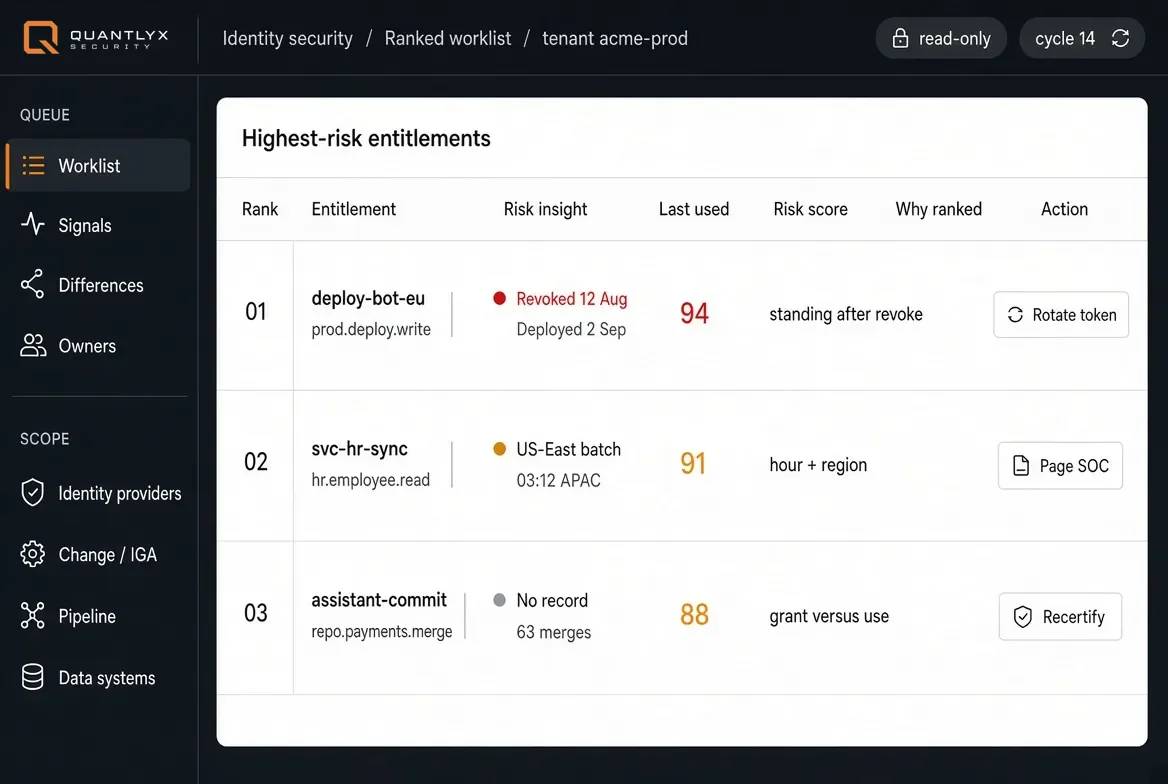
Ranked worklist on a sample tenant. A pilot shows your own identities and evidence.
How to secure the identities in a CI/CD pipeline
Three steps, in order.
1. Find every identity
A release involves people, build identities, release bots, coding agents and service accounts. Each one should have an owner.
2. Compare what was approved with what ran
A change that shipped without a matching approval is a finding. Reading the approval and the build together shows it.
3. Size the response to the risk
Let pre-agreed policy actions run on their own, report contained and reversible steps to a reviewer at once, and have a person decide anything permanent or anything that could stop a release.
The identities in a pipeline
A release is no longer one person pressing a button. Five kinds of identity take part, and each should have an owner, an approval and a record of what it did.
People
Engineers, reviewers, release approvers and the humans who hold break-glass paths.
Coding agents
Assistants that author, refactor and merge under a credential borrowed from a person.
Build identities
Runners and signing keys that turn a commit into a released artefact.
Release bots
Automation that promotes, deploys and rolls back, often with standing production access.
Service accounts
Long-lived identities wired into scanners, migrations and integrations nobody re-certifies.
Approved versus shipped
A change request says what a person approved. The pipeline shows what actually ran, and under which identity. Quantlyx compares the two and raises the places where they disagree: a change approved for a person but made by a bot, a pipeline identity nobody enrolled, a revoked grant that is still deploying. The full explanation is on change requested versus what ran.
What Quantlyx flags in a pipeline
Standing access after revoke
A grant was revoked on the record and the pipeline still uses it.
Owner gone, grant live
A service account or bot whose owner has left, still running with the access it had.
An agent with no owner
A runner or coding agent that holds repository write access and deployment credentials, uses them daily, and was never certified or assigned an owner.
Change versus what ran
The change was approved for one action and the pipeline did another.
Each one is a named entry in the NHI misuse threat library, with the commit, build, deployment or checkout that produced it.
How a finding is handled
Each finding is ranked by risk and routed with its evidence to the SIEM, the service desk and change management. The accountable owner gets the evidence, not a score.
The response is sized to the risk. Pre-agreed policy actions run on their own, contained and reversible steps are reported to a reviewer at once, and anything permanent, or that could stop a release, waits for a person. QuantQFix proposes the fix, and someone other than the proposer approves it.
Discovery is read-only, there are no agents on hosts and no write path into your pipeline, and nothing leaves your tenant. See identity threat remediation for the three tiers.
What it reads
Quantlyx reads GitHub, GitLab and Jenkins for the identities that commit, build and deploy, alongside your identity provider and cloud, with read-only credentials. It attributes each commit, pull request and access event to a verified identity, including an agent acting on behalf of a person.
CI/CD pipeline identity security: common questions
What is CI/CD pipeline security?
It is the practice of protecting the path from commit to production, the path that DevOps and platform teams run. Most tools look at the code and its dependencies. This page covers the other half: the identities that commit, build, sign and deploy, and whether what they did was approved.
What is DevOps security?
DevOps security, also called DevSecOps, is the practice of building security into the way software is built, tested and released, so that development and operations teams can move quickly without leaving gaps. Part of it is the code and its dependencies. The other part is access: which people, build identities, release bots and coding agents can reach the pipeline, and whether what they did was approved. This page covers that second part.
Are build runners and release bots non-human identities?
Yes. A runner, a signing key, a release bot, a service account and a coding agent are all identities that are not a person. Each holds access, and each should have an owner and an approval on record.
How is this different from code scanning and secret scanning?
Scanning tools look at code, dependencies and the secrets inside them. Quantlyx looks at the identities that build and ship them: who or what acted, under what authority, and whether anyone approved it. They answer different questions and work side by side.
What does NIST say about securing a software pipeline?
NIST's Secure Software Development Framework (SP 800-218, version 1.1, February 2022) recommends that software producers separate and protect each development environment, and store code so that only authorized people, tools and services have access. Its examples include minimizing direct human access to build systems and regularly logging, monitoring and auditing the trust relationships between components. Each of those depends on knowing which identities, human and non-human, can reach the pipeline.
Can a coding agent be a pipeline identity?
Yes. A coding agent that commits, merges or deploys is an identity like any other. Quantlyx puts it on the same register as people, with an owner and a record of what it did, and flags an agent that holds access nobody approved.
What would a pilot read?
A pilot connects read-only to one lifecycle path for two weeks and compares the approval record with what the pipeline did. If nothing turns up, you keep a clean report.
See what your pipeline identities did
Read-only pilot. One lifecycle path. If nothing turns up, you keep a clean report.